Do you know? What is the stress of running a small business? It is similar to wearing too many hats at once. One minute you are responding to client emails, and the next minute you are looking at invoices. Or update project timelines. This multitasking has to be done on one screen. But it’s hard to stay focused and organized with too many tabs open. This is why most entrepreneurs are switching to a dual-monitor setup. It is an easy upgrade that needs no complicated equipment or a large budget. Feels like a smart move, doesn’t it? Let’s find out in this blog how it is helping entrepreneurs or small businesses.
What Are Dual Monitors and How Do They Benefit Small Businesses
A dual monitor system is one that has two screens rather than one. This provides you with an expanded digital workstation, in which numerous tools remain on-screen simultaneously. You are able to maintain communication on one screen yet perform actions on the other. This setup supports smoother multitasking and faster responses.
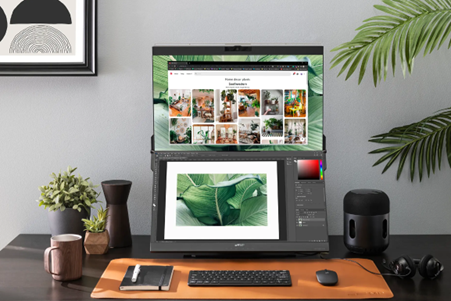
Modern solutions like Geminos dual monitor are designed specifically for compact desks and home offices. They stack screens vertically instead of spreading them wide. This makes them practical for small business owners who want efficiency without clutter.
How Dual Monitors Improve Multitasking for Entrepreneurs
Working With Multiple Business Tools and Staying Focused
Entrepreneurs use numerous tools on a daily basis. Email, CRM, calendars, and accounting software. These tools have two screens and can remain open simultaneously. No more time is wasted on reopening tabs or searching for tabs that have been lost. A single glance gives you what should be done. This ensures that your workflow is in motion and your focus intact.
Less Switching Leads to Better Productivity
Every time you switch windows, your brain resets slightly. This can slow down progress over a complete day more than most individuals know. This friction is minimized by dual monitors. You switch tasks easily without losing focus. Work becomes less painful and exhausting.
Dual Monitors Improve Client Management
Faster Client Communication
Clients appreciate a fast response. Two screens let you keep messages open while working. You do not need to pause whatever you are doing and check an email or chat. You are quicker in your reply and remain active without losing the flow.
Fewer Errors in Proposals and Invoices
Accuracy is necessary in client work. Dual monitors let you view client details while drafting a proposal or invoice. This minimizes the errors in copying and omitted information. When everything is in sight, you have more confidence and clarity in your work.
Real World Use Cases for Small Business Owners
Sales and Lead Tracking
Sales teams benefit from keeping lead lists on one screen while writing follow-ups on the other. This setup speeds outreach and improves consistency. You see context and history without switching views.
Client Onboarding and Documentation
Onboarding involves forms. Contracts. Notes. With two screens, you review documents while updating records. This keeps onboarding smooth and professional.
Daily Operations and Scheduling
Calendars. Payments. Task lists. Dual monitors allow you to monitor schedules while handling day-to-day work. This improves planning and reduces missed deadlines.
Cost-Effective Dual Monitor Setups for Small Businesses
Right Setup Without Overspending
You do not have to spend a lot of money to get benefits. A large number of entrepreneurs are good with average screen sizes and standard resolutions. The goal is clarity and space, not luxury specs. Thoughtful choices keep costs low and impact high.
Features that Handle Tasks Easily
A 24-inch stacked dual monitor works best for handling clients’ chat on the screen and other work simultaneously. The other part that makes a mess are wires. For these embossed docking system is a solution.
Why Entrepreneurs Struggle With Multitasking and Client Management
Business owners have to do multiple tasks at a time. They have to check emails and make changes to proposals. At the same time, they have responded to clients’ messages. To do all this work, they have to open multiple tabs on a single screen. Due to this, sometimes a wrong click closes the tab. Also, sometimes it becomes difficult to find the working tab. These are small breaks throughout the day that have a big impact on your overall productivity. On the other hand dual monitor setup helps you reduce these small but constant interruptions.
Best Practices to Get the Most Out of Dual Monitors
Give Both Screens a Purpose
The best way to work on a dual screen is by giving a role to each screen. You can choose one screen for communication and another for active work. By doing this, you will remain focused, and the screen will be less cluttered.
Easy Workflow Habits that Work
You can arrange software, tools, and apps on your window systematically. A smart way is to place important things on the predictable screen side. This way, you can manage tasks easily without clicking or scrolling too much.
Final Thoughts
In the case of entrepreneurs and small business owners, productivity is a daily concern. Dual monitors provide an efficient means of handling various tasks and clients without complicating the system. They make days at work easier. If you want a compact solution that fits modern workspaces, take a closer look at the suggested dual monitor and see how it can support your daily workflow. With the right setup, even small changes can create big improvements.
Publisher: Source link